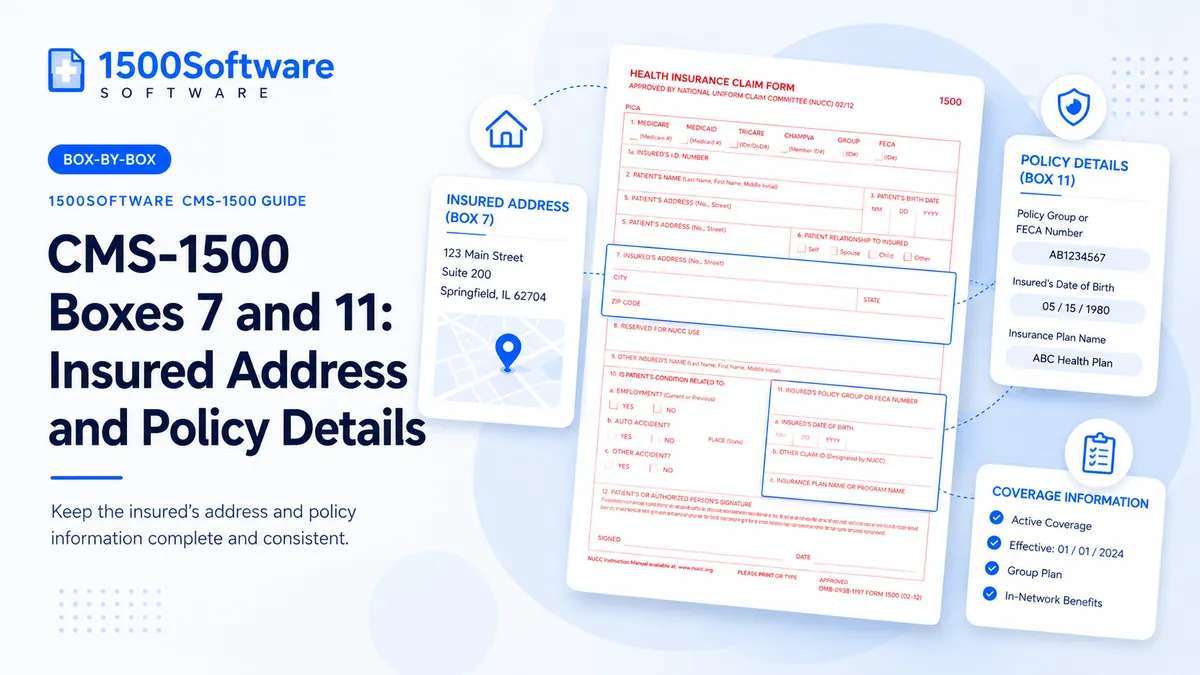
A practical guide to completing Boxes 7 and 11: Insured Address and Policy Details accurately and consistently.
From our workflow: For Insured Address and Policy Details, we compare the entry directly with the insurance card, eligibility response, and payer enrollment record. A value can look complete and still be wrong if it came from an old claim or the wrong person’s record.
Provide the subscriber address and plan or group information required by the payer.
An entry for Insured Address and Policy Details may be the right length and still be the wrong value. The surrounding coverage, provider, and service information has to support it.
Why payers care about this value
The payer does not read Insured Address and Policy Details in isolation. We compare it with the surrounding claim data before deciding the entry is ready.
Passing an edit is not the same as filing an accurate claim. For Insured Address and Policy Details, correct the underlying record instead of substituting a value that merely looks acceptable.
A reliable way to enter the data
- Identify the person, organization, date, code, or identifier the field is asking for.
- Locate the source document: insurance card, eligibility response, clinical note, authorization, provider enrollment record, fee schedule, or payer remittance.
- Enter the value using the form’s structure and the payer’s required format.
- Compare it with related fields and service lines for consistency.
- Save evidence of the source and the final submitted claim.
Where errors tend to appear
- Copying patient data without checking.
- Omitting a group number.
- Placing a plan name in the wrong field.
A prior claim is useful for comparison, but we recheck Insured Address and Policy Details against the insurance card, eligibility response, and payer enrollment record. Coverage, enrollment, authorizations, codes, and addresses can change between visits.
Final review
- Review the card and eligibility.
- Distinguish member ID from group number.
- Enter the plan name in the designated field.
- Verify employer-related data only when required.
- Compare the completed claim with the clinical and billing record.
- Confirm the receiving address or electronic route.
- Keep a secure copy and proof of submission.
Using software without skipping review
A dependable program can reuse stable records and flag inconsistent entries for Insured Address and Policy Details. It should not silently guess at information that is absent or uncertain.
Source material
The sources below describe the national form or transaction framework. Check the payer’s current instructions before filing.