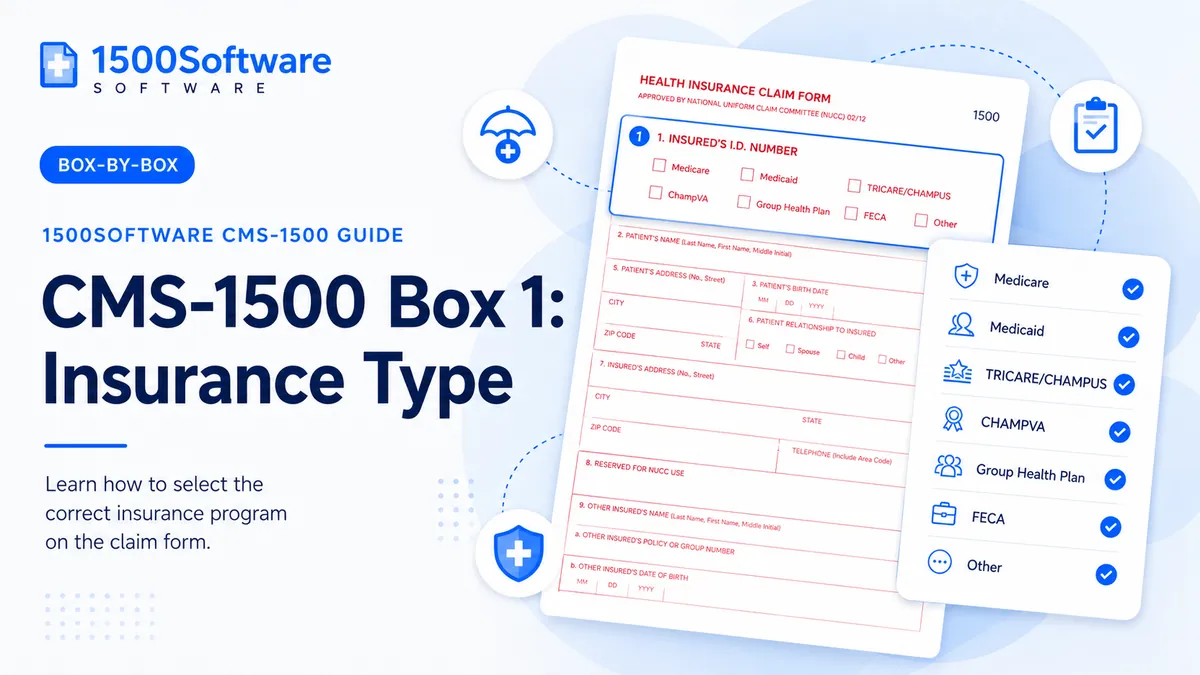
A practical guide to completing Box 1: Insurance Type accurately and consistently.
From our workflow: For Insurance Type, we compare the entry directly with the original source record and the receiving payer’s current instructions. A value can look complete and still be wrong if it came from an old claim or the wrong person’s record.
Select the coverage category indicated by the payer or program.
An entry for Insurance Type may be the right length and still be the wrong value. The surrounding coverage, provider, and service information has to support it.
Why this deserves a careful check
For Insurance Type, we also check the related patient, insured, provider, diagnosis, and service-line data. A field can pass a format edit and still be inconsistent with the claim around it.
Passing an edit is not the same as filing an accurate claim. For Insurance Type, correct the underlying record instead of substituting a value that merely looks acceptable.
How to enter it consistently
- Identify the person, organization, date, code, or identifier the field is asking for.
- Locate the source document: insurance card, eligibility response, clinical note, authorization, provider enrollment record, fee schedule, or payer remittance.
- Enter the value using the form’s structure and the payer’s required format.
- Compare it with related fields and service lines for consistency.
- Save evidence of the source and the final submitted claim.
Mistakes worth catching early
- Choosing a category because it sounds close.
- Checking multiple boxes without a payer rule.
Copying an old claim can save time only after the current facts are verified. Recheck Insurance Type, especially when the payer, provider, or date of service has changed.
Final review
- Verify the plan type from the card or eligibility response.
- Follow the payer guide.
- Use one clear selection unless instructed otherwise.
- Compare the completed claim with the clinical and billing record.
- Confirm the receiving address or electronic route.
- Keep a secure copy and proof of submission.
What the software should handle
Software is useful for formatting and consistency checks around Insurance Type, but it cannot create missing documentation or decide a payer-specific value. The source record still controls the claim.
Primary references
These are the national sources we use as a starting point. The receiving payer may add more specific instructions.